
Growth Navigate: An Overview and Startup Tools Guide
Growth Navigate is the name used by GrowthNavigate.com, a website that presents business advisory services, publishes articles, and lists startup software. The phrase “growth navigate startup tools” also appears in independent software guides. It does not, by itself, identify one application, subscription, or connected product suite.
That distinction matters when you are trying to choose software. A directory can help you discover options, but each vendor sets its own features, prices, eligibility rules, and data policies. A familiar brand name in a roundup does not mean the publisher owns it or has tested every feature.
This guide explains the website, compares practical tools for sales, planning, analytics, marketing, automation, payments, and support, and shows how to build a stack for your stage. You will also find current free-plan checks, US and Canadian considerations, worked cost examples, an implementation plan, and a subscription audit. The goal is a small system your team can use and maintain.
Research checked October 18, 2026. Vendor limits can change. Dollar examples use USD unless stated otherwise; hypothetical examples are not vendor quotes. Recommendations reflect public-document research, not claimed hands-on product testing.
What Is Growth Navigate?
Growth Navigate is a business-services and publishing website at GrowthNavigate.com. Its public pages promote funding support, financial advisory, planning, and technology services, alongside articles and a startup-tool directory. Treat the company’s service descriptions as its own claims, and distinguish that website from similarly named domains and independent software roundups.
The website, the directory, and the wider search phrase
The GrowthNavigate.com homepage presents a mixture of service information and editorial content. Its startup-tools page lists third-party products across writing, communication, productivity, and customer management. Those listings are discovery resources. They are not evidence that one Growth Navigate account gives you access to the named products.
Three distinctions help prevent confusion:
- Company website: A source for what that business says it offers.
- Software directory: A collection of products that require separate evaluation.
- Search phrase: Wording independent publishers use when discussing startup growth software.
Another domain, growth-navigate.com, describes a startup-tool recommendation site and its evaluation approach. The hyphen changes the address. The reviewed pages do not establish common ownership with GrowthNavigate.com. The same caution applies to other similar domains and social handles.
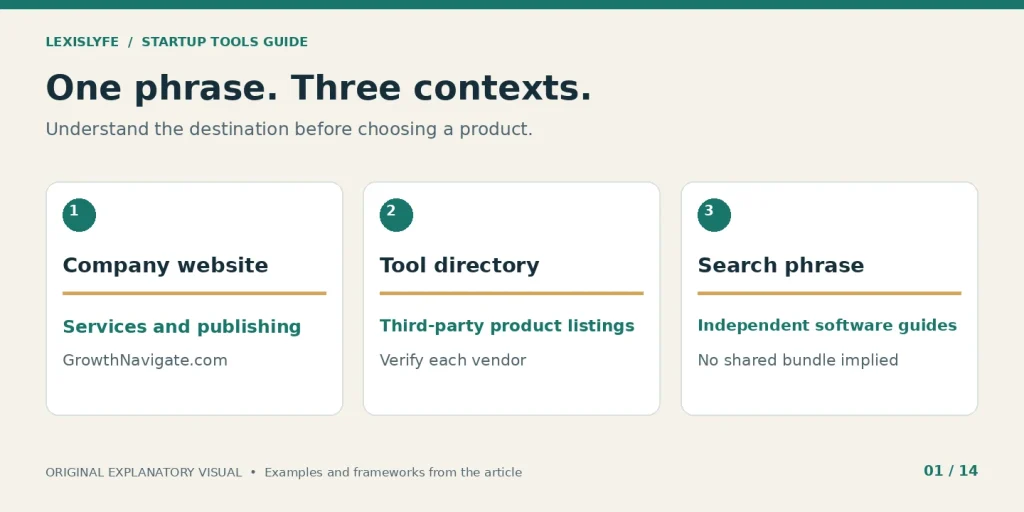
The company, a tool listing, and a search query serve different purposes.
What the public pages establish, and what they do not
A useful overview separates observable page content from independently verified business credentials. The homepage establishes that services are advertised. It does not establish that a funding outcome will occur, that every testimonial is independently authenticated, or that a listed software partnership exists.
| Public information | Reasonable interpretation | What still needs checking |
|---|---|---|
| Service descriptions | The website advertises those services | Contracting entity, provider, scope, and credentials |
| Startup software listings | The website recommends or describes tools | Vendor features, pricing, and relationship disclosures |
| Articles and contributed content | The site acts as a publisher | Author expertise and supporting sources |
| Contact and policy pages | Contact details and policies are published | Current validity and how they apply to your engagement |
Its About page lists Samantha Steele as Director of Financial Strategy and Sayush Khandelwal as Head of Finance & Tech. Those names and roles are company-provided information, not independent credential verification. This guide does not infer an owner, founding date, regulatory status, or verified investment track record from a website footer or third-party profile.
How to use the site for research or services
For software research, open the vendor’s own page after making a shortlist. Confirm the exact tier, billing term, export options, and integration you need. Keep the directory separate from the purchase decision.
Before purchasing a proposed paid service, request a written scope and identify the contracting business before sending sensitive documents. Check the published privacy policy, then ask how your information will be handled for that engagement. No standard consulting fee was verified in the reviewed material, so this guide does not publish an assumed price.
Which Startup Tools Should You Choose First?
Choose software for the first operational problem you can describe and measure. Missed follow-ups suggest a CRM; unclear ownership suggests a task system; unknown conversion paths suggest analytics. Start with the fewest applications needed to capture demand, deliver the work, collect payment, and review results, then add tools when a specific limitation appears.
A solo founder can begin with a shared document, a lead spreadsheet, a calendar, and a reliable way to invoice customers. Moving to dedicated software becomes useful when that simple arrangement creates observable errors or consumes too much time.
Use this problem-to-tool map before reading any ranked list:
| Current problem | First category to consider | Proof the tool should produce |
|---|---|---|
| Prospects receive no follow-up | CRM | Every active lead has an owner and next action |
| Work gets delayed between people | Project management | Tasks show ownership, deadline, and status |
| Website visits do not explain sales | Web analytics | Valid leads can be connected to acquisition sources |
| Users sign up but do not get value | Product analytics | A defined activation funnel reveals the drop-off |
| Information is copied repeatedly | Workflow automation | One reliable handoff replaces repeated manual entry |
| Customers repeat the same question | Support knowledge base | Approved answers are easy to find and maintain |
| Bills and subscriptions are unclear | Accounting and spend tracking | Costs reconcile to actual payments and owners |
One tool per job is a helpful starting rule, not a rigid limit. A CRM may include forms and scheduling, so buying separate products for all three jobs can create unnecessary overlap. Conversely, a specialized product may justify its place when the bundled feature cannot handle a real requirement.
Before adding anything, answer these questions:
- Problem: What goes wrong today, and how often?
- Owner: Who will configure, use, and maintain the application?
- Outcome: Which measure should improve during the trial?
Write the answers in one paragraph. If the paragraph is vague, take another week to understand the workflow. Software selection becomes easier when the work itself is clear.
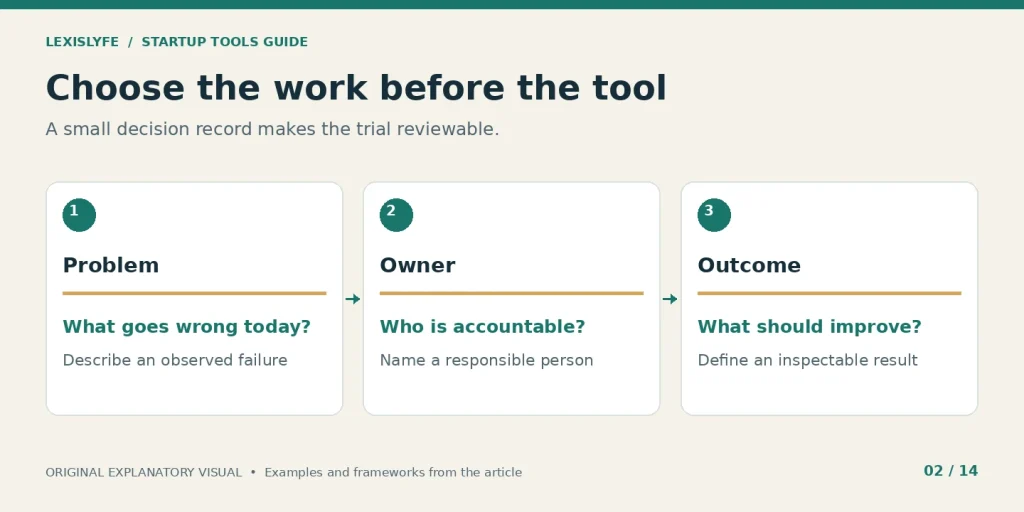
Define the work before choosing the product.
What Belongs in a Practical Startup Tool Stack?
A practical stack covers customer information, work coordination, measurement, communication, money movement, and customer help. Marketing and automation sit across those functions. You do not need a separate subscription for each category, but you do need a clear place where each important record lives and a person responsible for keeping it accurate.
Think in terms of records and responsibilities. The CRM stores customer status. A project board stores delivery commitments. Accounting records explain income and expenses. Analytics describes observed behavior. A chat message can alert someone to a change, but it should not become the only durable record of that change.
Use this short glossary when comparing products: System of recordThe designated authoritative home for a particular type of information, such as a customer account or an invoice. IntegrationA connection that reads or writes data between systems, subject to permissions, supported fields, and plan limits. ActivationA defined action or sequence that suggests a new user has reached an initial useful outcome in your product. Usage allowanceThe volume included in a plan, measured in units such as tasks, contacts, messages, seats, or events. Exit costThe work and expense required to export records, rebuild workflows, train people, and leave a service.
A connected stack needs three basic agreements:
- Record authority: Decide which application owns each field.
- Handoff rules: Define when another system should receive an update.
- Exception ownership: Name the person who handles incomplete or failed transfers.
For example, your CRM might own a lead’s sales stage while accounting owns invoice status. An integration can display invoice status in the CRM without letting every salesperson rewrite the accounting record. That arrangement reduces conflicting edits and preserves accountability.
Avoid treating every connection as a two-way sync. Two-way updates need conflict rules. For an early team, one authoritative source and one controlled downstream update can be easier to understand, test, and recover.
Which Sales and Planning Tools Are Worth Comparing?
HubSpot and Salesforce are reasonable CRM candidates, while Notion, Asana, ClickUp, and Miro cover different planning needs. Compare them using your actual records and workflows rather than a general popularity ranking. A useful trial should demonstrate lead ownership, visible commitments, searchable decisions, appropriate permissions, and an export your team can understand.
HubSpot for a small customer pipeline
The HubSpot CRM page currently describes a free CRM with up to two users and 1,000 contacts. Its listed functions include contact, deal, and task management, meeting scheduling, and email tracking. Advanced capabilities depend on the relevant paid product and tier.
Best fit: A founder or small sales team that needs one view of leads and next actions. Main limitation: The existence of a free CRM does not make every marketing or sales feature free.
A useful pilot should include:
- Lead owner: Assign one person to every active opportunity.
- Next action: Record what should happen and when.
- Deal stage: Use stages that describe an actual buying step.
Before committing, check:
- User growth: Price the number of people who will need access.
- Automation access: Verify that the required workflow exists in the selected tier.
- Export quality: Download a test set and inspect fields and associations.
For example, a website agency could track inquiry, discovery call, proposal, decision, and closed outcome. “Interested” is a weak stage because two teammates may interpret it differently. “Proposal sent with decision date” gives the team a concrete next step. Measure overdue follow-ups during the trial rather than judging the product by its dashboard appearance.
Salesforce Starter Suite for a defined sales process
Salesforce Starter Suite currently advertises a starting price of $25 USD per user per month, billed monthly or annually, with transaction fees applying. The page describes sales, service, marketing, and commerce functions. A broader product ecosystem does not mean every integration or customization is included in Starter.
Best fit: A team with a documented sales process and someone able to own CRM administration. Main limitation: Configuration and training can cost more than the headline subscription suggests.
Trial tasks should include:
- Pipeline setup: Recreate the stages your team actually uses.
- Lead routing: Show how a new inquiry reaches the right person.
- Reporting: Produce one report that changes a weekly decision.
Questions for the vendor include:
- Required edition: Which exact plan supports the connector you need?
- Implementation work: Who configures fields, permissions, and reports?
- Contract scope: What changes if you add seats or upgrade later?
For three users, the advertised starting subscription produces a $75 monthly base calculation before other costs. That arithmetic is a planning input, not a complete quote. A two-person business with an uncomplicated pipeline should compare the additional administration against a simpler CRM before choosing it.
Notion for documentation and a company knowledge base
Notion’s pricing page lists Free, Plus, Business, and Enterprise plans. The free plan has limits for teams with two or more members, and AI access differs by tier. Do not assume that a free workspace includes unrestricted team collaboration or unlimited AI usage.
Best fit: A team that needs procedures, research notes, decisions, and lightweight planning in one searchable place. Main limitation: Flexible pages can become disorganized unless someone maintains their structure.
Start with three collections:
- Decisions: Record what changed, why, and who approved it.
- Procedures: Explain the repeatable tasks another person must perform.
- Customer learning: Store interview notes with dates and consent boundaries.
Keep the workspace useful with:
- Page owners: Give important documents a responsible maintainer.
- Review dates: Flag instructions that may have become stale.
- Permission checks: Test what a contractor can see before inviting them.
A good procedure states its trigger, required inputs, steps, and completion condition. “Handle onboarding” is too broad. “After the first payment clears, send the setup form and assign the implementation owner” is usable. Treat a procedure as a maintained operational record, not a document you write once and forget.
Asana or ClickUp for work that crosses people
Asana Personal currently permits two users to collaborate free. ClickUp offers a different mix of work, documentation, and planning features. Compare the exact permissions, storage, automations, and reporting in the plan you would buy.
Best fit: Delivery work with several owners, deadlines, and dependencies. Main limitation: Creating more tasks does not improve delivery when priorities remain unclear.
A minimal project board needs:
- Outcome: State the customer or business result the task supports.
- Owner: Give one person responsibility for moving it forward.
- Completion rule: Describe what someone must verify before marking it done.
Watch for these trial failures:
- Unowned work: Tasks move between people without accountability.
- Duplicate planning: The same commitment lives in two competing boards.
- Status theater: People update labels but cannot identify the next action.
For a landing-page launch, separate copy approval, design, build, tracking checks, and publishing. Make their dependencies visible. A simple board, including a lightweight alternative such as Trello, may be enough if the workflow is short. Buy more advanced planning only when it resolves coordination work you can actually observe.
Slack and Miro for communication and collaboration
Slack’s free plan currently provides 90 days of searchable message history and up to 10 app integrations. Miro’s free plan includes three editable boards. Their jobs differ: Slack handles conversation; Miro helps teams arrange ideas visually.
Best fit: Teams that need shared discussions or live planning sessions. Main limitation: Conversations and whiteboards can hide decisions unless outcomes are written into a durable record.
For communication, establish:
- Channel purpose: Explain what belongs in each discussion space.
- Response expectations: Distinguish urgent requests from routine updates.
- Decision capture: Link the final decision to the relevant document or task.
Prepare each visual workshop with:
- A question: Define the decision the session should resolve.
- An owner: Name the person who will turn the outcome into action.
- A final record: Save an understandable summary outside the live discussion.
Chat is a conversation, not a permanent operating manual. Before upgrading for history or private collaboration, check how your team retrieves old decisions and how the plan’s access settings work. A visually impressive workshop has little value if no one knows what changed afterward.
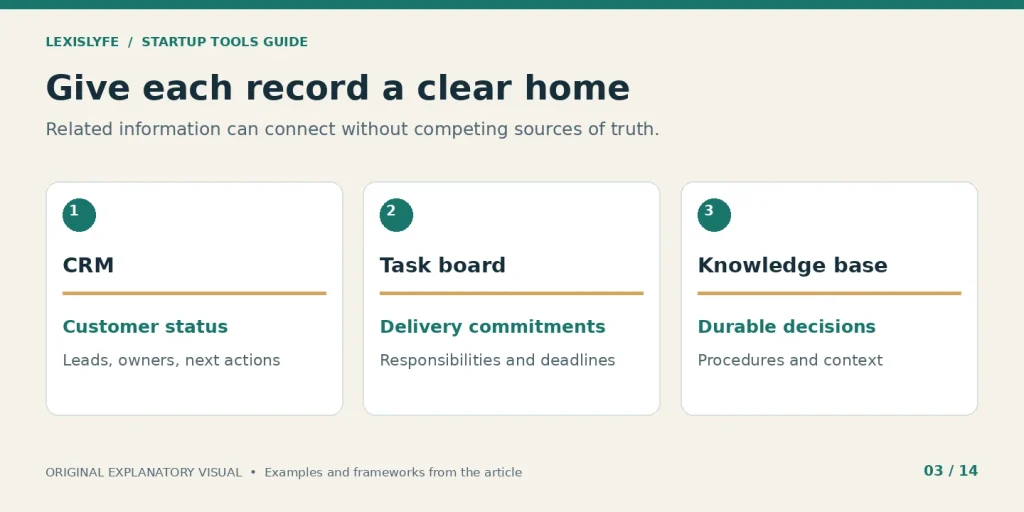
Assign a clear home to customer status, delivery work, and durable decisions.
Which Analytics and Research Tools Answer Useful Questions?
Use web analytics to understand acquisition, product analytics to investigate behavior after signup, and search tools to assess organic discovery. Market databases can help you research companies and investors. Each tool should answer a defined question; adding a second dashboard is useful only when it supplies evidence your existing system cannot provide.
Google Analytics 4 and Search Console for website discovery
Google Analytics 4 uses an event-based measurement model. Google Search Console helps site owners understand their presence in Google Search. The two systems answer different questions and should not be expected to produce matching totals.
Best fit: A business that needs to understand search visibility and website actions. Main limitation: Setup errors, consent choices, blocking, attribution rules, and incomplete measurement affect what appears in reports.
Begin with questions such as:
- Acquisition: Which channels bring visitors who take a useful action?
- Conversion: Which page or device shows a repeated problem?
- Search visibility: Which queries lead to impressions and visits?
Validate the setup by checking:
- Real actions: Confirm that a form submission creates a genuine record.
- Event meaning: Separate button clicks from completed customer requests.
- Duplicate firing: Ensure one completion does not become several conversions.
For example, a “Get a quote” click is an expression of interest. A successfully submitted quote request is a different event. If your report counts the click as a completed lead, advertising may appear more effective than the actual inbox suggests. Keep the measurement definition beside the report.
Amplitude or Mixpanel for activation and retention
Amplitude and Mixpanel provide product-analytics capabilities with plan-specific usage and feature limits. Review the current billing unit instead of copying an old article’s free-event allowance. Event volume and available analysis features are separate considerations.
Best fit: A product with enough user activity to investigate a repeated behavioral question. Main limitation: A detailed event stream is not useful when nobody agrees what successful usage means.
A starter event plan might track:
- Account created: A valid account was successfully established.
- Core action completed: The user achieved a meaningful first outcome.
- Value repeated: That useful action happened again within a defined period.
Before expanding tracking, establish:
- Identity rules: Explain how anonymous and signed-in activity connect.
- Property definitions: Keep the meaning of fields consistent.
- Data restrictions: Exclude unnecessary personal or sensitive information.
Suppose a proposal app considers a user activated after sending a first proposal, not after visiting the dashboard. Your first funnel should investigate the steps between signup and that send. An event is evidence of behavior, not proof of motivation. Pair the funnel with customer conversations before deciding why people stopped.
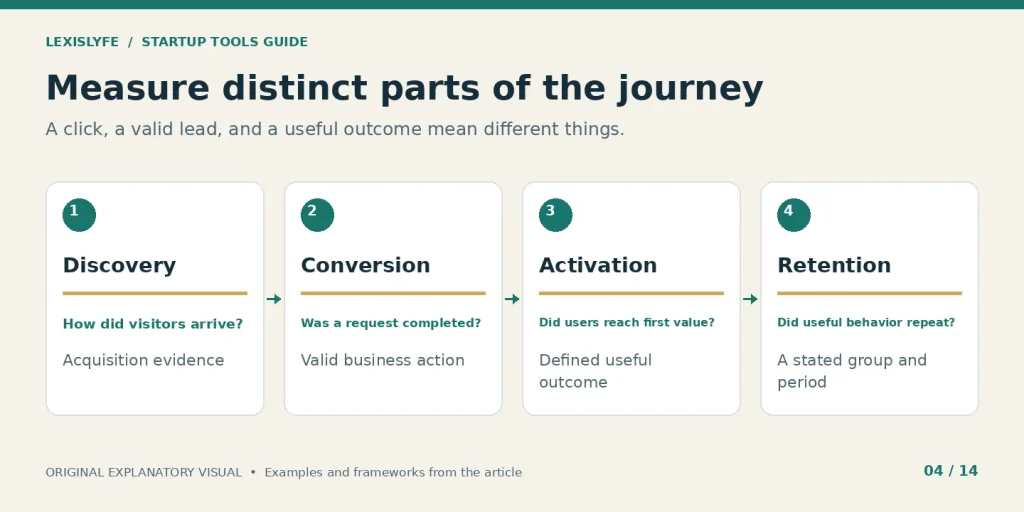
Different stages need different questions and clearly defined evidence.
Ahrefs or Semrush for a specific search opportunity
Ahrefs and Semrush publish plan-specific research tools and allowances. Their estimates can support prioritization, but a reported keyword volume, difficulty score, or competitor traffic estimate is not a guaranteed result for your website.
Best fit: A team that publishes or improves search-focused content consistently. Main limitation: Paying for research does not create expertise, useful pages, or demand on its own.
Use a subscription to produce:
- A defined topic set: Group queries around the same customer problem.
- A realistic competitor review: Inspect the pages behind the reported numbers.
- An action queue: Identify pages to create, improve, merge, or remove.
Check your buying decision against:
- Research cadence: Will someone use it regularly enough to justify the expense?
- Plan allowances: Are the needed exports, projects, and reports included?
- First-party evidence: What can Search Console already tell you about your site?
A new business may learn more from five customer interviews and its existing search data than from hundreds of exported keywords. Once there is a clear content process, a paid research tool can speed it up. Research should end in a decision, such as improving a pricing page that attracts impressions but fails to answer a common buying question.
Crunchbase and Dealroom for company and ecosystem research
Crunchbase and Dealroom present company and ecosystem research products. They can help you identify potential competitors, partners, and investors. A database entry is a starting point, not an assurance that a company’s status, investment focus, or contact information is current.
Best fit: A founder with a narrow research question and a defined company profile. Main limitation: Large lists can create activity without improving the quality of your decisions.
Before collecting records, define:
- Geography: Where the target business or investor actually operates.
- Fit: Which sector, stage, customer type, or partnership need matters.
- Evidence: Which facts require checking on the organization’s own website.
When reviewing a candidate, record:
- Source date: Note when you checked the supporting information.
- Reason for fit: Explain why this organization belongs on the shortlist.
- Next action: Specify the useful step after research.
For example, “US funds” is too broad to guide outreach. “Funds that publicly describe investing in early-stage B2B workflow software” is more useful. A smaller list with clear reasons can support better conversations. It also gives you a way to remove entries when the underlying evidence no longer matches your criteria.
Which Marketing and Content Tools Deserve a Place?
Choose marketing tools around a repeatable customer journey: discover the business, understand the offer, request help or try the product, and return for further value. Email, social scheduling, design, and AI drafting support parts of that journey. Buy the capability you need to run a defined campaign, not a promise of automatic demand.
Mailchimp or ActiveCampaign for an intentional email process
Mailchimp’s current free plan lists 250 contacts, up to 500 monthly sends, and a 250-send daily limit. Those limits differ from figures in several competitor guides. ActiveCampaign is another option to evaluate for lifecycle marketing and automation.
Best fit: A business with a clear reason to email people who may appropriately receive those messages. Main limitation: A contact in a CRM is not automatically a valid marketing subscriber.
Design the email process around:
- Entry condition: Explain why a person receives the message.
- Useful content: Match the message to what that person requested or needs.
- Exit condition: Stop or change the sequence after an unsubscribe or relevant outcome.
Before choosing a plan, check:
- Audience billing: Understand which stored contacts count toward charges.
- Automation tier: Confirm that your intended sequence is supported.
- Suppression handling: Test how opt-outs move between connected systems.
A sample onboarding email might help a trial user complete the first project. A later promotional campaign has a different purpose. Keep the purpose and permission record explicit. A free tier is a bounded allowance, not a universal operating budget, and a send limit can matter before your contact count reaches its ceiling.
Canva and Buffer for a manageable publishing routine
Canva offers design tools across different plans. Buffer’s free plan currently supports up to three channels, 10 scheduled posts per channel, and one user account. Check each connected network’s supported publishing behavior before scheduling a campaign.
Best fit: A small team that already knows what it wants to publish. Main limitation: Faster content production does not fix an unclear offer or weak audience fit.
Prepare a compact publishing brief:
- Audience problem: Name the question or frustration the post addresses.
- Desired action: Decide what someone should do after reading it.
- Evidence: Supply the example, demonstration, or source behind the claim.
Use a review routine that checks:
- Asset rights: Confirm that images, fonts, and templates fit the intended use.
- Accuracy: Review names, dates, product claims, and destination links.
- Accessibility: Check legibility, captions, and useful image descriptions.
A service business can test one recurring educational post and one project example each week rather than filling every available queue. Measure qualified inquiries or meaningful engagement with the intended audience. Consistency is a process, not a requirement to publish at the highest possible frequency.
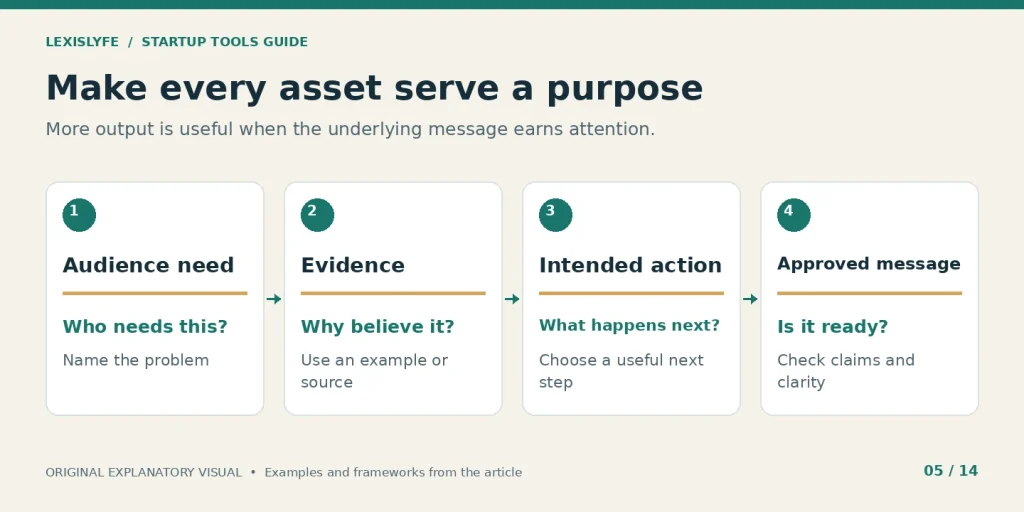
Build a repeatable review process before increasing output.
Jasper for brand-focused drafting with human review
Jasper’s pricing page currently lists Pro and Business options, with a trial and plan-specific brand and workflow capabilities. Compare the current billing selection and included seats. This guide does not reuse an older “Creator” plan price as a current quote.
Best fit: A marketing team that repeatedly adapts approved material for different formats or audiences. Main limitation: Generated text still needs factual review, editorial judgment, and a clear reason to exist.
A useful drafting input includes:
- Approved facts: Give the system the product details it may state.
- Audience context: Explain who will read the material and what they need.
- Voice examples: Show the desired tone with usable, authorized samples.
Review the draft for:
- Unsupported claims: Remove invented statistics, case studies, or endorsements.
- Unclear promises: Replace vague benefits with an explanation of actual behavior.
- Sensitive data: Confirm that submitted material fits the organization’s policies.
Compare the whole task, including correction and review, with your current process. A draft produced quickly can still be expensive if every factual sentence needs repair. Measure accepted output, such as approved campaign variants, rather than raw words generated. Keep a human responsible for the final published message.
How Should Automation, Payments, and Support Fit Together?
Automation should move reliable information between defined systems, while payments and support require explicit ownership and recovery paths. Start with a handoff you already understand. Confirm what happens on success, failure, duplicate submission, cancellation, and customer opt-out before allowing the workflow to affect real customers or financial records.
Zapier or Make for a tested repeated handoff
Zapier’s free plan currently includes 100 tasks per month, unlimited Zaps, and two-step Zaps. Its paid plans add capabilities such as multistep workflows. Make’s pricing information describes a free allowance of 1,000 monthly credits. Tasks and credits are not interchangeable units.
Best fit: A stable, repeated process where supported connectors can remove manual entry. Main limitation: A connection can fail or change; a workflow needs monitoring and an owner.
Document the automation’s contract:
- Trigger: The specific event that starts the workflow.
- Action: The change the workflow is allowed to make.
- Evidence: The record that shows whether the action succeeded.
Test at least these cases:
- Duplicate input: The same submission arrives twice.
- Missing data: A required field is blank or malformed.
- Service failure: A connector rejects the request or loses authorization.
If a workflow needs three actions after a trigger, do not assume a free two-step Zap supports it. Map the process against the actual tier. Automation volume is a workload estimate, so account for branching, retries, and the platform’s current billing rules instead of multiplying leads by an assumed universal task cost.
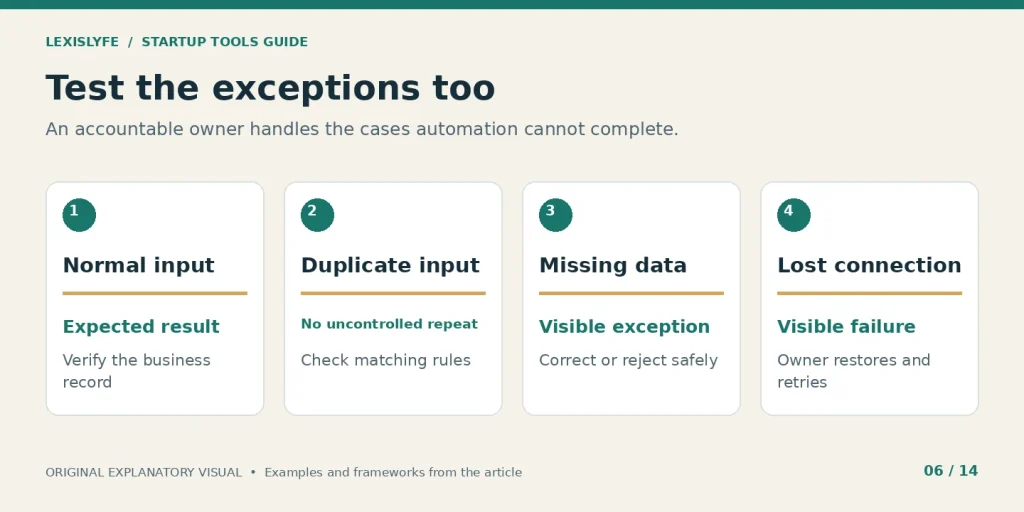
Reliable automation includes exception handling and a responsible person.
Stripe for payment processing and subscription events
Stripe publishes pricing that varies with product, payment method, country, currency, and other conditions. Use the country-specific schedule for your account. Do not present a US domestic-card rate as the full cost of accepting payments from every customer in Canada and the United States.
Best fit: A business that needs an eligible payment-processing setup with supported integrations. Main limitation: Payment processing, subscription logic, tax handling, and accounting are separate requirements even when related products connect them.
Define the payment workflow around:
- Completion: Identify the confirmed event that means payment succeeded.
- Fulfillment: State when service access or delivery should begin.
- Reconciliation: Explain how the transaction reaches accounting records.
Include exceptions such as:
- Refunds: Decide how access and reporting should change.
- Failed renewals: Assign responsibility for contacting or assisting the customer.
- Duplicate events: Ensure repeat notifications do not create duplicate fulfillment.
A browser returning to a thank-you page is weaker evidence than a verified successful payment event from the processor. Revenue reporting needs a defined source. Link operational reports to reconciled financial records and keep payment, refund, and access states understandable to the people handling customer questions.
Puzzle, Xero, or FreshBooks for usable financial records
Puzzle, Xero, and FreshBooks offer different approaches to accounting and related workflows. Compare the country edition, reporting, integrations, services, and professional support available for your business. A software subscription and a human bookkeeping service are not automatically the same purchase.
Best fit: A business that needs invoices, expense records, reconciliation, and reliable reporting. Main limitation: Clean financial records still require accurate inputs, categorization, and review.
Use the evaluation to confirm:
- Bank connections: Your actual financial accounts can connect appropriately.
- Workflow fit: Invoices, refunds, expenses, and payments can be handled.
- Reporting access: The people responsible can obtain the reports they need.
Ask about:
- Country support: Confirm the relevant business and tax context.
- Service boundaries: Identify what software does and what a professional must do.
- Record portability: Inspect exports before relying on the product as the only record.
Lexislyfe’s explanation of revenue versus profit is useful context when headline sales figures look impressive. Growth decisions need a consistent definition of the number being discussed. A sales dashboard is not a cash forecast, and neither replaces accounting review.
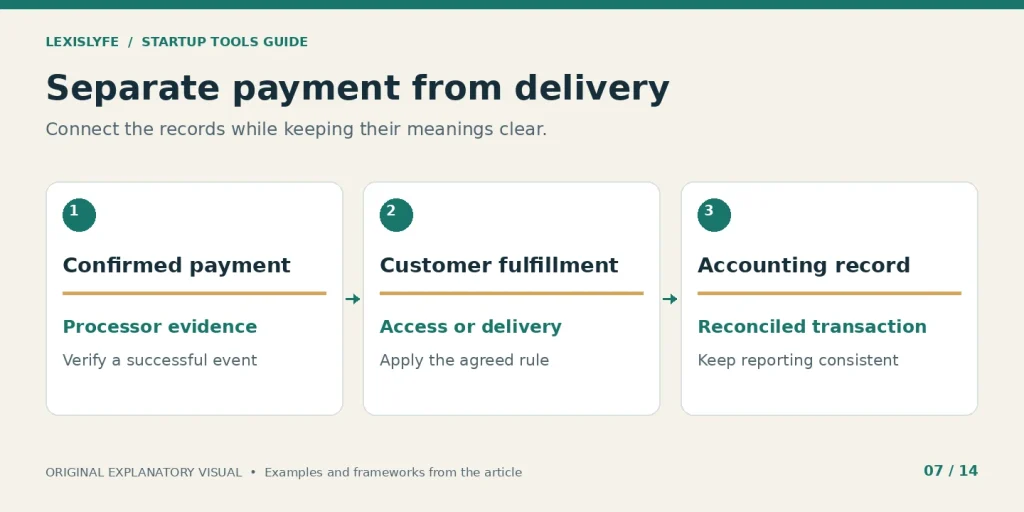
Related records need a clear connection without losing their separate meanings.
Intercom and a maintained knowledge base for customer help
Intercom publishes plan and AI-related pricing components. Compare seats, usage, supported channels, and any outcome-based charges before estimating the total. A knowledge base can also begin in a simpler system if your support volume and requirements are modest.
Best fit: A team handling recurring customer questions across a defined support process. Main limitation: An AI answer system cannot supply trustworthy answers when the underlying information is missing or outdated.
A useful support record should show:
- Customer problem: Describe the issue in the customer’s terms.
- Current owner: Name who is responsible for moving it forward.
- Resolution evidence: Record what actually fixed the problem.
For automated answers, require:
- Approved sources: Use maintained documentation with a clear owner.
- Human escalation: Provide a practical way to reach a person.
- Review samples: Inspect real answers for accuracy and missed intent.
A recurring billing question may require a clearer invoice explanation rather than a more elaborate chatbot. Support is a learning system: repeated questions should feed product improvements and better instructions. Measure resolution quality and repeat contacts alongside speed, so a fast but unhelpful response does not count as success.
How Should Your Stack Change as the Business Grows?
Change your stack when the work becomes measurably harder, rather than when the business reaches a fashionable funding label. Validation needs customer learning; early traction needs reliable follow-up and delivery; scaling needs clearer permissions, reporting, and cross-team handoffs. Revenue, customer count, and team size are useful context, but they do not impose universal software thresholds.
Validation: learn before adding infrastructure
At the idea stage, the most important evidence comes from conversations, realistic demonstrations, and actual buying behavior. Keep records simple enough that you can change direction without a migration project. A document and a structured spreadsheet can be entirely appropriate.
Prioritize these capabilities:
- Interview records: Capture the problem, context, and the customer’s own wording.
- Offer testing: Show a specific deliverable and a clear next step.
- Learning log: Record what evidence changed the next decision.
Delay purchases driven by:
- Imagined scale: A possible future requirement has no current owner or workload.
- Dashboard appeal: Reporting looks impressive but does not guide an action.
- Discount pressure: A promotional deadline replaces an actual buying need.
A founder exploring a booking product might first test whether appointment reminders solve a repeated customer problem. Building a complex growth stack before that test makes the project more expensive without answering the central question. At validation, learning speed matters more than reporting depth.
Early traction: make the basic journey reliable
When customers arrive consistently, improve the handoffs that affect their experience. That may mean a CRM, a delivery board, a payment connection, and a short weekly report. The important change is a repeatable process, not a sudden increase in application count.
Add structure where you see:
- Missed demand: Useful inquiries are not acknowledged or assigned.
- Delivery gaps: Customers wait because the next person lacks context.
- Unclear results: The team cannot connect activity to completed outcomes.
Keep the operating rules explicit:
- One owner: Every handoff has a person responsible for completion.
- One source: Each key field has an authoritative home.
- One review: The team checks exceptions and results on a set schedule.
For a small training business, the meaningful journey may be inquiry, suitability call, booking, payment, attendance, and follow-up. A tool should improve one of those steps. If the same person already completes the entire journey accurately, a simpler setup may remain the better choice.
Scaling: improve governance before adding more systems
As more people share work, access control, reporting definitions, change management, and recovery become more important. Enterprise software can be justified by a specific customer or operational requirement, even at low revenue. Conversely, funding does not automatically justify a warehouse, advanced CRM, or expensive analytics contract.
Look for concrete triggers:
- Permission needs: Different roles require different access to records.
- Reliability needs: Manual recovery is no longer practical at current volume.
- Reporting needs: Multiple teams need a consistent shared definition.
Plan the upgrade around:
- An accountable administrator: Someone owns configuration and change review.
- A tested migration: Important records and workflows survive the move.
- A measurable outcome: The upgrade removes a documented constraint.
| Stage | Immediate priority | Reason to add capability | Reason to wait |
|---|---|---|---|
| Validation | Understand demand | Manual records hide important learning | No repeatable problem has appeared |
| Early traction | Follow up and deliver reliably | Handoffs fail often enough to affect customers | Existing tools still handle the work clearly |
| Scaling | Coordinate across roles and systems | Access, reliability, or reporting requirements exceed the current setup | The purchase only anticipates possible future growth |
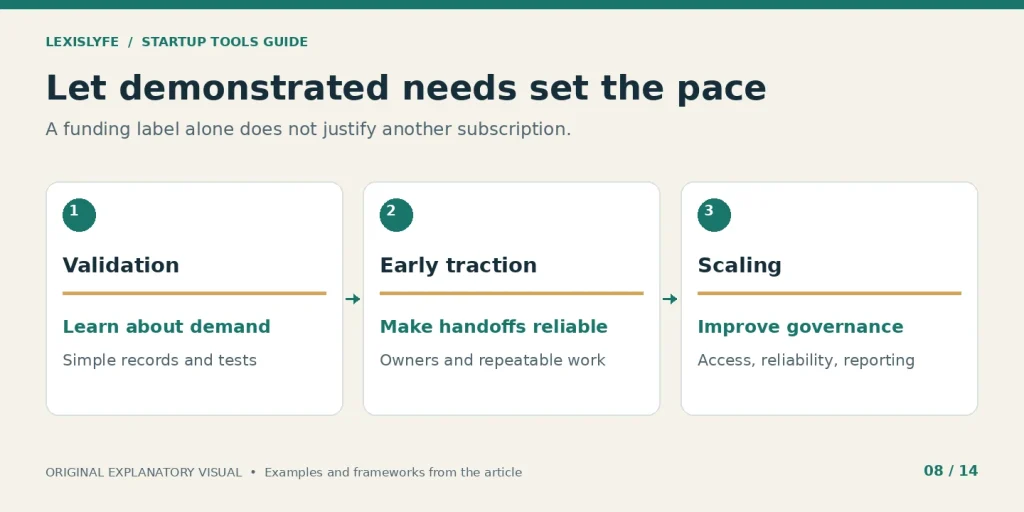
Funding labels provide context; observed constraints justify changes.
What Would a Lean Stack Look Like for Your Business Model?
A B2B service business needs strong follow-up and delivery tracking, while a product-led SaaS business needs activation and retention evidence. Ecommerce adds order and fulfillment requirements. Choose examples as starting configurations, then remove anything your existing systems already handle. The useful unit is a complete customer journey, not a fixed number of subscriptions.
A founder-led service business
Small agencies, consultancies, and training providers can center its workflow on a simple CRM, a task board, invoicing, and a knowledge base. Add scheduling when arranging calls becomes a repeated burden. A separate chat product is optional when the team is small and existing communication works.
The essential records are:
- Opportunity: Who needs help, what they need, and the agreed next step.
- Commitment: What you promised, who owns it, and when it is due.
- Payment: What was billed, paid, refunded, or remains outstanding.
During the weekly review, ask:
- Pipeline health: Which proposals need a decision or follow-up?
- Delivery risk: Which commitments are blocked and why?
- Economics: Which services remain worthwhile after delivery time and costs?
For readers starting from service work, Lexislyfe’s guide to building online service income explains why fees, preparation, revisions, and available demand matter alongside a headline project price. A profitable offer comes before a sophisticated stack.
A product-led SaaS business
A software product may need web analytics, product analytics, payments, support, and a lifecycle-email process. Its CRM requirements depend on the sales motion. A self-serve product with little direct selling does not necessarily need the same pipeline setup as a sales-led enterprise product.
Start by defining:
- First value: The product action that gives a new customer a useful result.
- Repeat value: The behavior that suggests the product remains useful.
- Assistance path: How someone gets help before giving up.
Then choose systems that show:
- Activation drop-off: Which step prevents users from reaching first value.
- Retention evidence: Which signup groups return and complete useful work.
- Commercial context: How usage relates to paid accounts without confusing users with subscriptions.
A product with three paying organizations and many individual users needs both an account model and a user model. Joining those records incorrectly can inflate customer counts or misread churn. Solve that identity problem before building advanced dashboards.
An ecommerce business or digital-product shop
If the commerce platform already manages orders, payment status, transactional email, and basic reporting, use those capabilities before adding parallel systems. A digital-download seller has different delivery and inventory needs from a company shipping physical products.
Check the existing platform for:
- Order authority: One reliable record of the purchased item and payment state.
- Delivery evidence: Confirmation that the product or download was supplied.
- Customer assistance: A clear route for access problems, refunds, and questions.
Add another tool only when it improves:
- A repeated workload: The same task consumes time across many orders.
- A real limitation: Required reporting or fulfillment behavior is unavailable.
- A measurable result: The change improves delivery, response quality, or another defined outcome.
Do not rebuild a platform feature without a reason. A separate CRM may be worthwhile for wholesale relationships or high-value sales, but it can add little to a shop whose main need is clearer product information and dependable delivery.
| Business model | Start with | Add when justified | Avoid duplicating |
|---|---|---|---|
| B2B service | Lead records, delivery board, invoicing | Scheduling and a reliable handoff automation | Multiple competing customer lists |
| Product-led SaaS | Activation measurement, billing, support | Cohort reporting and lifecycle workflows | Conflicting customer and subscription definitions |
| Ecommerce | Existing order and fulfillment system | Specific email, support, or reporting capability | Orders or payment states already handled correctly |
What Do Free Plans and Real Software Costs Look Like?
Free plans can support useful work, but their limits apply to different units: people, contacts, messages, tasks, credits, or editable boards. Estimate the complete cost at your expected usage and team size. Include setup, maintenance, training, add-ons, and exit work before deciding that one product is cheaper than another.
Current free-plan checks
The following limits were visible on official pages checked for this guide. They are 2026 research findings, not promises about future availability. Each vendor name links to the relevant page so you can confirm the tier before signup.
| Product | Verified free-plan boundary | Practical question before relying on it |
|---|---|---|
| HubSpot CRM | Up to 2 users and 1,000 contacts | Will the people who need access fit? |
| Slack | 90-day searchable history; up to 10 apps | Where will lasting decisions be stored? |
| Asana | 2 collaborating users | Does the team require more collaborators? |
| Miro | 3 editable boards | Can old workshop material remain usable? |
| Mailchimp | 250 contacts; 500 sends/month; 250/day | Does a campaign hit sending limits first? |
| Zapier | 100 tasks/month; two-step Zaps | Does the intended workflow require more steps? |
| Make | 1,000 credits/month | How does this actual workflow consume credits? |
| Buffer | 3 channels; 10 queued posts/channel; 1 user | Does the publishing routine fit those boundaries? |
A free plan can still be the right choice after you understand its limit. The mistake is building a critical process around a capability that is absent, temporary, or too small for the workload.
Calculate the full cost with one consistent model
Use this planning relationship:
Monthly equivalent cost = subscriptions + usage and add-ons + maintenance time value + monthly allocation of setup and training.
For an illustrative three-user CRM project, suppose the vendor subscription is $75 per month, setup requires six hours valued internally at $30 per hour, and ongoing maintenance takes one hour per month at that same internal rate. Allocating setup across six months gives a monthly equivalent of $135: $75 + $30 + $30.
| Illustrative cost item | Calculation | Monthly equivalent |
|---|---|---|
| Subscription | 3 × $25 | $75 |
| Setup allocation | 6 hours × $30 ÷ 6 months | $30 |
| Maintenance | 1 hour × $30 | $30 |
| Total planning cost | $75 + $30 + $30 | $135 |
Only the $25 starting Salesforce subscription used in this example is vendor-sourced; the hours, internal rate, and allocation period are hypothetical assumptions. Taxes, usage, extra products, migration, and other fees are excluded, so this is not a full purchase quote.
Before approving spending, record:
- Billing unit: Seat, workspace, contact, transaction, event, or usage credit.
- Commitment: Monthly flexibility or an annual payment and contract.
- Expected workload: The normal case and a plausible busy month.
Also check:
- Plan gates: Whether a critical connector or export requires a higher tier.
- Renewal terms: What changes after a promotion or startup discount ends.
- Exit effort: Whether records, attachments, and workflows can move elsewhere.
An annual price shown as a monthly equivalent can still require a full annual payment upfront. Compare the cash commitment as well as the displayed monthly figure. Cheap entry is not the same as low ownership cost.
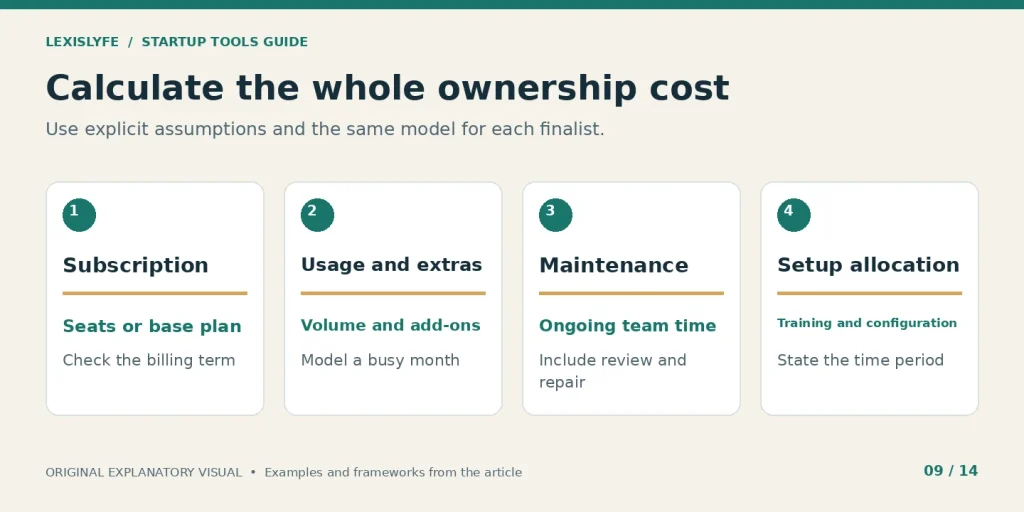
Use the same cost categories for every shortlisted product.
How Can You Compare Tools Without Inventing Scores?
Compare tools through observable acceptance checks instead of unsupported ratings such as “4.8 out of 5 for scalability.” Give each candidate the same sample workflow and record what happened. Separate required conditions from preferences, and preserve the evidence behind the decision so another teammate can understand why the chosen tool earned its place.
Create a small test pack with representative, synthetic data. Include a normal record, an incomplete record, a duplicate, and an account with restricted access. Use the same pack for each finalist instead of exploring unrelated features during every demo.
Define your requirements in three groups:
- Must work: A condition that would make the product unsuitable if it fails.
- Useful improvement: A capability that reduces workload or improves the experience.
- Future possibility: Something you may need but cannot yet justify buying.
Keep the decision record specific:
- Observed behavior: State what the application did in the test.
- Evidence location: Save a permitted export, note, or vendor-document link.
- Open question: Record anything the trial did not resolve.
| Acceptance check | Example evidence | Decision consequence |
|---|---|---|
| Needed workflow works in the chosen tier | Completed sample from input to result | Required before purchase |
| Restricted user sees appropriate data | Tested role with synthetic records | Required for the planned access model |
| Export is usable | Downloaded fields and relationships inspected | Reduces migration uncertainty |
| Team can complete the task | User finishes without hidden administrator steps | Supports adoption confidence |
| Cost is understandable | Written plan and usage assumptions | Makes budget comparison meaningful |
A vendor statement can answer what is advertised. A trial can answer what your team successfully completed. Keep those evidence types separate. Unknown is a valid result when a feature cannot be tested; it is more useful than a fabricated score.
If two products pass the essential checks, prefer the one your team can maintain with less ongoing work, unless a specific benefit justifies the added effort. Record the reason in plain language. That explanation will be useful when someone revisits the choice six months later.
How Do You Connect Tools Without Creating New Problems?
Connect tools by defining the event, authoritative record, allowed change, and recovery path for each handoff. Test failures before expanding the workflow, and avoid circular updates that can overwrite correct information. A native connector or automation platform helps move data, but it does not decide ownership, consent, record identity, or exception handling for you.
A lead-to-follow-up workflow you can test
Consider a service inquiry sent through a website form. The immediate goal is to create one accurate customer record and assign a useful follow-up. Newsletter enrollment is a separate action and needs its own appropriate permission and purpose.
Build the first version in this order:
- Validate the form and required fields using synthetic test submissions.
- Find or create the CRM record using a documented matching rule.
- Assign an owner and a due date for the requested response.
- Record a workflow result so failures can be found and retried safely.
- Notify the responsible person with a link to the authoritative record.
The test pack should include:
- A new person: One submission creates one appropriate record.
- A returning person: The matching rule preserves relevant existing information.
- A repeated submission: The same request does not generate uncontrolled duplicates.
Challenge the failure path with:
- An invalid address: The record is flagged instead of silently accepted.
- A disconnected account: Someone can see the failure and restore authorization.
- A retry: Repeating the action does not create duplicate tasks or messages.
An email address can be a useful matching field for a small workflow, but it is not a universal permanent identity. Addresses change and can be shared. Document the limits of the chosen rule, and introduce stable record identifiers when the business requires them.
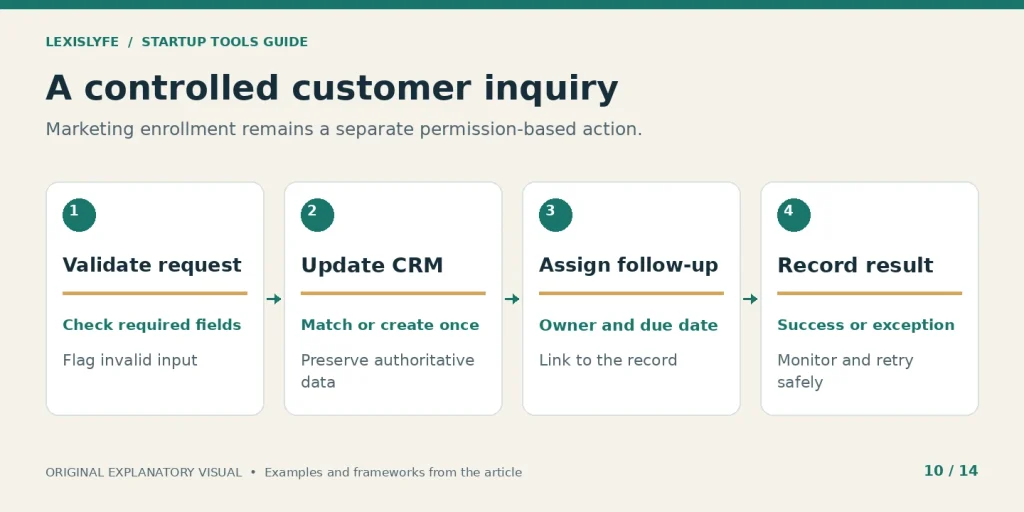
Keep marketing enrollment separate from responding to a customer inquiry.
Permissions and monitoring belong in the design
A connection should receive only the access needed for its task. Use an accountable business owner for critical integrations and document how another authorized person can recover them. Avoid letting a former contractor’s personal account become the only route to repair a live workflow.
Maintain a short operating record:
- Connection owner: Who approves and maintains the integration.
- Failure destination: Where alerts arrive and who checks them.
- Recovery instruction: How to pause, correct, retry, or roll back safely.
Review the workflow after a vendor update, a field change, or a plan change. A connector that worked last month may still run while transferring incomplete information. Inspect sample records and real outcomes as well as success indicators. A green status does not prove that the business result is correct.
What Should US and Canadian Teams Check Before Signing Up?
US and Canadian teams should confirm account eligibility, billing currency, country-specific features, email rules, data handling, and the responsibilities of anyone supplying a paid service. A product being available online does not establish that every advertised feature, financial account, promotion, or support arrangement is available to your particular business.
Currency, country editions, and provider identity
For Canadian buyers, a USD price and a CAD price are different offers. Do not silently convert one using an assumed exchange rate. Confirm the checkout currency, payment terms, applicable charges, and the edition’s supported business workflows.
Check the actual account context:
- Business location: The company is eligible for the selected service.
- Billing currency: The quote and renewal use the currency you expect.
- Local workflow: Required banking, reporting, or support behavior is available.
For services involving business banking, eligibility needs separate review. Mercury’s official website describes its offering and associated banking arrangements; a directory label does not establish that your business qualifies. This article does not recommend a financial account or infer deposit coverage from a software roundup.
Marketing permission and customer data
The FTC’s CAN-SPAM guide explains US commercial-email requirements, including accurate sender information, truthful subject lines, a postal address, and a working opt-out. The CRTC’s CASL guidance describes Canada’s consent, identification, and unsubscribe framework, with details and exceptions that depend on the circumstances.
Translate those requirements into observable workflow behavior:
- Permission record: Preserve the source and purpose of marketing enrollment.
- Suppression handling: Make opt-outs reach every connected sending system.
- Message purpose: Distinguish customer service responses from promotional campaigns.
For privacy and security review, ask what customer information each application receives, why it needs that information, and who can access it. Confirm retention, deletion, export, subprocessors, and relevant contract terms with the vendor. These questions should be answered for the actual data and jurisdictions involved, rather than by treating a generic “compliant” badge as a complete assessment.
Access, offboarding, and sensitive records
The simplest useful practice is a maintained access register. It should show which tools exist, who owns them, and how access is granted and removed. Use multifactor authentication where available and appropriate, and keep credentials out of shared documents and chat messages.
Check the process with a test offboarding:
- Ownership transfer: Critical pages, workflows, and billing access remain available.
- Access removal: The departing account loses access as intended.
- Connection continuity: Required integrations continue under authorized ownership.
Access control is an ongoing process. The right plan is the one that supports the controls your work actually needs, with a team able to operate them. A lower price has little value if the chosen tier cannot meet an essential customer requirement.
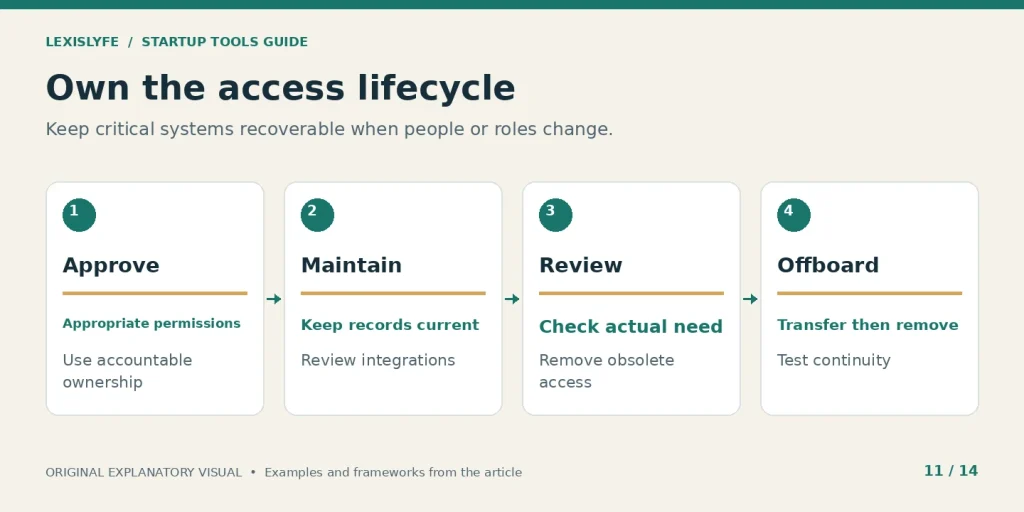
Ownership and offboarding need attention before the first administrator leaves.
Which Metrics Show Whether the Stack Is Helping?
Measure whether the tools improve a defined customer or operational outcome, then compare that improvement with the complete cost of running them. Useful measures include overdue follow-ups, time to first value, repeated useful activity, delivery delays, and reconciled revenue. Keep definitions, time periods, and denominators consistent so apparent improvements are not just reporting changes.
A small weekly operating scorecard
Choose a few metrics tied to current decisions. A service business may focus on qualified inquiries, proposal outcomes, and delivery delays. A software product may add activation and retention. Track the numbers you can act on rather than filling a dashboard with every available field.
| Measure | Example definition | Decision it supports |
|---|---|---|
| Overdue follow-ups | Active leads with a past-due next action | Redistribute work or repair reminders |
| Lead-to-customer conversion | New customers ÷ qualified leads from a defined group | Investigate offer, qualification, or sales process |
| Activation rate | Eligible new accounts reaching first value ÷ eligible new accounts | Improve onboarding or product guidance |
| Retention | A defined signup group returning for useful work in a stated period | Investigate sustained value |
| Delivery delay | Commitments completed after their agreed date | Address blocked work or unrealistic scope |
| Automation exceptions | Failed or incorrect handoffs requiring intervention | Repair data, permissions, or workflow logic |
Write a definition beside each metric:
- Population: Who or what is included, and what is excluded?
- Time window: Which period is being measured?
- Owner: Who investigates a change and proposes action?
A metric can improve for the wrong reason. Fewer support tickets might mean clearer instructions, or it might mean that customers cannot find the contact button. A higher conversion rate might reflect better qualification, or a changed denominator. Pair the number with operational evidence before celebrating.
A worked return-on-effort example
Suppose a repeated handoff takes four minutes and happens 120 times per month. That is 480 minutes, or eight hours, before automation. After introducing a workflow, suppose exceptions and maintenance take two hours monthly. The estimated release is six hours per month.
At a hypothetical internal planning value of $25 per hour, those six hours represent $150 of capacity value. If the added subscription costs $30 monthly, the difference is $120 before setup allocation and other costs. These are illustrative assumptions, not a claim about any vendor’s measured performance.
Evaluate the result using:
- Observed time: Compare recorded work before and after the change.
- Quality: Check whether error rates or customer experience changed.
- Real use: Confirm that released capacity supports valuable work.
Time released is not automatically cash saved. If no expense falls and no additional valuable work happens, report the result as capacity, not profit. That distinction keeps the business case honest and helps the next purchasing decision.
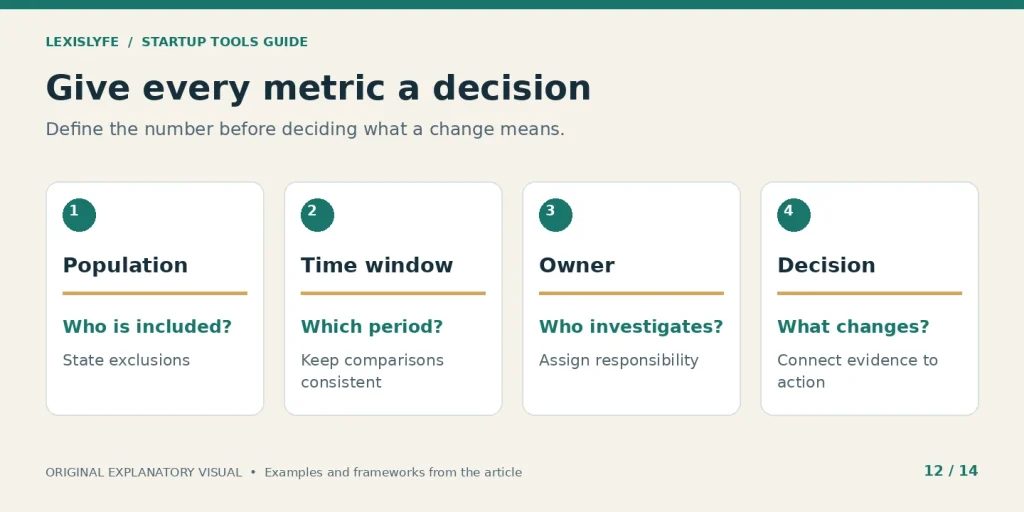
Useful measurement connects a number with an action someone can take.
How Can You Roll Out a Better Stack in 30 to 90 Days?
Roll out a stack by fixing one bottleneck, piloting the change with representative work, and checking the result before expanding. A 30-day cycle can establish the basic workflow; the next 60 days can improve adoption, reliability, and cost control. Keep a rollback path and avoid changing several important systems at the same time.
Days 1 to 7: establish the baseline
Observe the current journey from inquiry or signup to delivered value. Collect a few examples of missing information, repeated entry, and delayed handoffs. Choose one issue with a clear owner and a result you can measure.
Create a baseline record with:
- Current method: How the task works today.
- Observed problem: The concrete failure or repeated burden.
- Trial objective: The improvement you will check after the pilot.
A useful objective might be “every eligible inquiry receives an assigned follow-up by the next working day.” It is better than “improve productivity” because someone can inspect whether the outcome occurred.
Days 8 to 14: configure the smallest pilot
Choose a product or existing feature that can address the selected problem. Configure the essential fields and permissions, then run the synthetic test pack. Limit the first live pilot to a manageable scope with people who understand the current process.
Before going live, confirm:
- Acceptance checks: The normal and exception cases behave as expected.
- User instructions: The responsible people know what to do next.
- Recovery: You can pause or revert without losing important records.
Do not add unrelated features simply because the trial includes them. Every additional behavior makes it harder to tell which change caused an improvement or a problem.
Days 15 to 30: review adoption and outcomes
Inspect records and talk to the people doing the work. Check whether they use the system as intended, where they still copy information, and which exceptions need a clearer rule. Compare the outcome with the baseline using the same definition.
Use this short decision sequence:
- Confirm that the original problem still matters.
- Compare the observed result with the agreed objective.
- Review complete costs, maintenance, and unresolved risks.
- Keep, adjust, replace, or stop the pilot with a written reason.
A trial that fails can still be useful if it reveals an unclear process or a missing requirement. Record the lesson before trying another product. Otherwise, the next trial may repeat the same mistake.
Days 31 to 90: stabilize and expand deliberately
Extend the workflow only after the first version works reliably. Update procedures, teach new users with realistic examples, and review whether paid upgrades solve an observed limitation. Bring related teams into the decision when a change affects their records or responsibilities.
During expansion, check:
- Adoption: People can complete the work without hidden workarounds.
- Reliability: Failures are visible and recoverable.
- Cost: The actual workload still fits the chosen plan and budget.
By day 90, you should have a maintained record of the selected tools, their owners, their costs, and the jobs they perform. You should also know which applications you decided not to add. A documented decision to wait is useful progress when the existing method continues to serve customers well.
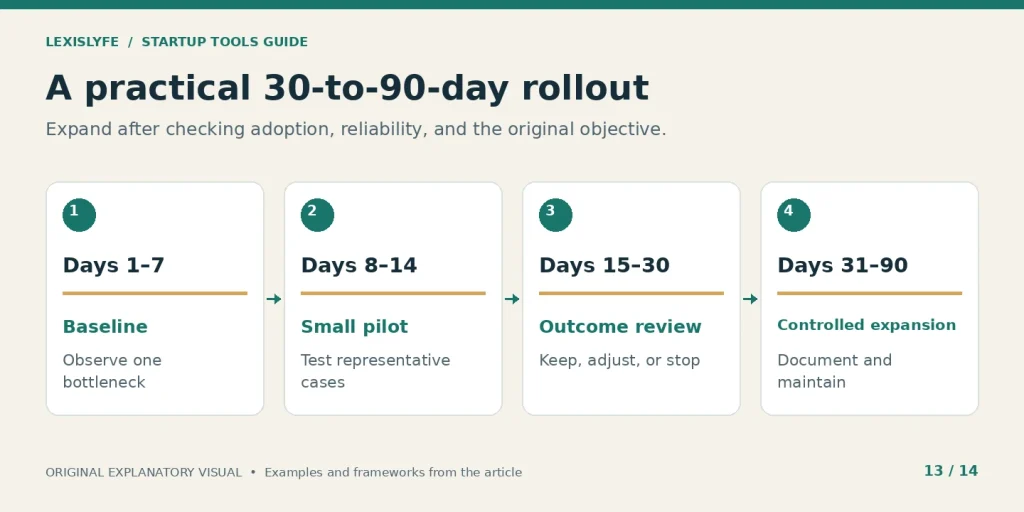
Expand after checking adoption and reliability, with the original objective still visible.
How Do You Audit, Replace, or Cancel a Tool Safely?
Audit software by its purpose, owner, actual use, complete cost, and dependencies. Cancel a subscription only after checking which records, integrations, and people depend on it. Export important information, test the replacement, and confirm access and renewal changes. A tool used infrequently may still be essential for a recurring reporting or contractual requirement.
A subscription inventory you can maintain
A startup subscription inventory should include every application, including free products that hold business information. A free account can still create access, data, and continuity problems. Review the inventory on a regular schedule and whenever someone leaves or a major workflow changes.
| Field | What to record | Why it matters |
|---|---|---|
| Purpose | The specific job the tool performs | Reveals overlap and unclear purchases |
| Owner | Responsible business administrator | Prevents abandoned accounts |
| Cost and renewal | Billing unit, term, date, and expected amount | Makes commitments visible |
| Actual use | Relevant activity and the work it supports | Distinguishes value from account existence |
| Dependencies | Integrations, reports, records, and users | Prevents accidental breakage |
| Exit plan | Exports, replacement, and deletion requirements | Makes a future move manageable |
During review, look for:
- Unused capability: Paid features have no current operating purpose.
- Duplicate function: Several systems solve the same job without a clear reason.
- Owner gaps: Nobody can explain or maintain an important account.
Avoid cancelling on usage alone. A quarterly reporting application may correctly show little activity between reporting periods. The better question is whether the application supports an important requirement at a reasonable complete cost.
A migration sequence that preserves the work
Switching tools creates its own operational project. Confirm what can be exported, including attachments, relationships, history, and important permission settings. A CSV containing contact names does not necessarily preserve a usable sales process.
Follow a controlled sequence:
- Inventory the records, workflows, permissions, and integrations being replaced.
- Export and inspect a representative sample before committing to the move.
- Map old fields and statuses to the new system, documenting any loss.
- Import test records and check relationships, duplicates, and access.
- Pilot the new workflow and define the cutover and rollback conditions.
- Confirm final records, redirect integrations, and remove obsolete access.
- Cancel or downgrade only after checking renewal and retention terms.
An export is not a backup until you know how to use it. Open a sample, check identifiers and dates, and confirm that a knowledgeable person can interpret the record. Plan the final data export after live changes have stopped or use an explicitly tested synchronization method.
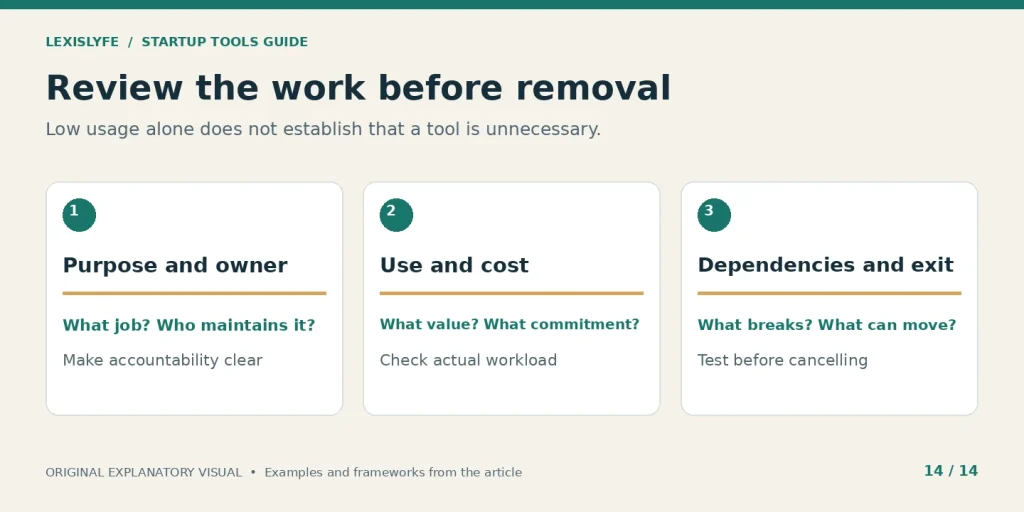
A safe audit examines the work that would be affected by removal.
What Common Mistakes and AI Trends Deserve Attention?
The biggest mistakes are buying before defining the problem, confusing a free account with an unlimited plan, automating uncertain processes, and trusting reports without checking their definitions. AI adds new ways to draft, summarize, analyze, and act across tools, but it also increases the need for reviewed inputs, clear permissions, and accountable approval.
Avoid promises that hide the actual work
A software guide should not promise that a certain application count guarantees faster growth. A vendor’s feature list does not establish your return, and an integration does not eliminate every possible error. Avoid universal rules such as “free always wins before revenue” or “every Series A company needs enterprise software.”
Use these corrections instead:
- Popular tool: Test the relevant workflow in the actual tier.
- Free claim: Check the current limits and the next useful upgrade.
- Growth promise: Ask what evidence supports the result for your situation.
Reviewing customer demand is also essential. If customers do not understand the offer or do not value the result, more marketing automation will spread an unconvincing message more efficiently. Fix the offer and learn from customers before scaling the delivery mechanism.
Treat AI capabilities as a controlled trial
The official pages reviewed for this guide show AI features embedded in products such as Notion, Slack, HubSpot, Jasper, and Intercom. Their availability and billing differ by product and tier. Compare the specific task, permitted data, review workload, and total cost instead of treating “AI included” as a complete feature description.
Begin with lower-consequence work such as drafting an internal summary from approved notes. Inspect the output against its source. For actions that change customer records, send communications, or affect access, decide what requires human review and how an incorrect action can be stopped or reversed.
Track three things during the trial: the accepted result, the correction effort, and any incorrect action or unsupported claim. That gives you a practical adoption decision without relying on a broad claim that AI will transform the entire business.
No-code website and application builders, including Webflow and Bubble, can be evaluated through the same approach. Test the actual customer journey, ownership, export or migration options, and ongoing maintenance. A faster prototype is useful when it helps you learn or deliver; it is not evidence that the operating problem has been solved.
Frequently Asked Questions
The most useful startup-tool questions concern the website’s identity, the first purchase, free-plan limits, total cost, integrations, and when to upgrade. The answers below follow the same rule as the rest of this guide: match a clearly defined job to a capability you can verify, and keep a responsible person attached to the result.
Conclusion
Use Growth Navigate as a starting point for understanding a business website and discovering startup software, then verify products with their vendors. Build around one observed constraint, a responsible owner, and an outcome you can inspect. Keep the stack small enough to maintain, and expand only when the work demonstrates a reason.
Your first action is straightforward: write down the task that causes the most repeated friction this week. Estimate how often it happens, what currently goes wrong, and who owns the result. Test one improvement with representative records before adding another subscription.
The strongest stack gives your team a shared understanding of customers, commitments, money, and results. Clear definitions, reliable handoffs, and regular review make the software useful. The brand names come after those decisions.